Before getting into these two integrations, it's worth recalling where MediLog comes from. In an article comparing Italy's FSE and a PHR, I explained why a PHR (Personal Health Record) is a radically different tool from an FSE (Electronic Health Record run by Italy's National Health Service, the SSN): the first is built around the patient, who controls it and decides what it contains and who can see it; the second is built around the healthcare service that provides it, with the patient more a recipient than an owner.
MediLog (the subject of this earlier piece) is the PHR I built on exactly that idea: a medical record that doesn't belong to any single facility, but to the patient — reports, documents, DICOM images, observations, wearable data, all in one place no matter which doctor, hospital, or clinic generated it. I built it first and foremost for personal and family use: managing my own medical history and that of the people close to me, without having to keep chasing reports scattered across different portals, each with its own credentials and its own interface. The two stories in this article — Garmin and DICOM — both grew out of that same very concrete need.
The Garmin fetch failed in production because Cloudflare blocks the OCI
datacenter's IP on every login strategy — not because of a bug. Fixed
by moving the login to a local app and routing the data through a temporary
MinIO staging bucket. The Canfield DermaGraphix videodermoscopy exam, locked
in a proprietary format with no export function, was extracted through UI
automation and converted into a standard DICOM study with
dicom_manager, then imported into Orthanc like any other exam.
A smartwatch that records everything, and a cloud service that lets nothing out.
MediLog was designed to also hold data from medical or sports wearable devices. A smartwatch records things like continuous heart rate and SpO2 (blood oxygen saturation), captured during exercise and at rest — information that, for many patients, already exists, collected daily by a sports watch, and that stays locked inside the manufacturer's app instead of sitting alongside the rest of their medical history.
For a Garmin user, the goal was simple to state: pull activities and heart-rate data from Garmin Connect and save them among the patient's data in MediLog, using the same “preview → confirm” pattern already used for lab reports. No Garmin credentials stored anywhere, and the fetch (retrieving data from the external service — here, Garmin Connect, called on demand to pull activities and heart rate) always triggered explicitly, never automatically.
Cloudflare sits between internet traffic and the real server behind a site or app: every request passes through its datacenters first, gets filtered there, and only continues on to the provider's actual server if it looks legitimate. It started as protection against attacks (absorbing waves of malicious traffic before they overwhelm the origin server) and as a content-delivery network, but the function that actually matters here is the third one: automatically detecting bots (programs that connect to a site or service in place of a person, often at a volume and speed no human could ever match) and scraping (using one of those programs to bulk-extract data from a site or service, usually without the owner's permission). The filter examines every request — the client's TLS fingerprint, its behavior, the reputation of the source IP address — before it ever reaches the application, trying to tell an automated program apart from a real person.
It's an extremely widely used service — a huge share of the world's internet traffic runs through its datacenters — precisely because protecting a login from automated credential-stuffing attempts or mass scraping is a problem shared by any service with a large user base, Garmin included: our fetch, however legitimate, looks from the outside exactly like the kind of automated traffic these filters exist to block.
The wall: the datacenter's IP is already flagged
The first production deploy of the direct fetch — via the unofficial
garminconnect library, which replicates the Garmin Connect app's
web/mobile login — failed systematically. Not with an authentication
error: with an upstream rejection, before the credentials even mattered,
flagged by the HTTP protocol itself with codes 429 (“too
many requests” — the server explicitly asks you to slow down, or
simply stops responding) and 403 (“forbidden”
— the request is recognized and blocked outright). Not application bugs
on our side: low-level responses, before the request ever really reaches
Garmin.
All five login strategies tried (combinations of mobile/widget/portal endpoints and underlying HTTP libraries) were rejected the same way, with the very same credentials that work fine from a regular browser. This wasn't a bug you could fix by retrying harder: our server's IP reputation was the problem, not the code.
We'd already run into this exact same pattern — the application handshake rejected immediately, reproducible with different credentials, not a temporary rate limit but a mark on the address itself — months earlier with our WhatsApp agent, which was never unblocked and was eventually removed from the platform. The most likely explanation in both cases: Cloudflare treats large cloud datacenter IP ranges as automated-traffic sources by default, regardless of what's actually happening behind any given request.
Our server runs on Oracle Cloud Infrastructure — we haven't (yet) empirically verified whether the same block would trigger from Azure, GCP, or AWS too, but the mechanism described has nothing OCI-specific about it, and caution suggests treating it as a structural risk of any IP with a “datacenter” reputation, not a quirk of our particular provider.
The workaround: move the fetch, not the data
The clean way to get access to the service's data would be to join the official Garmin Connect Developer Program, but every attempt I made to get into the program went unanswered, and various searches online turn up the same experience from other developers too. In the meantime I needed something that worked right away, without losing the self-service model: it has to be the user themselves (or a family member) who retrieves their own data, not a manual intervention from us every time.
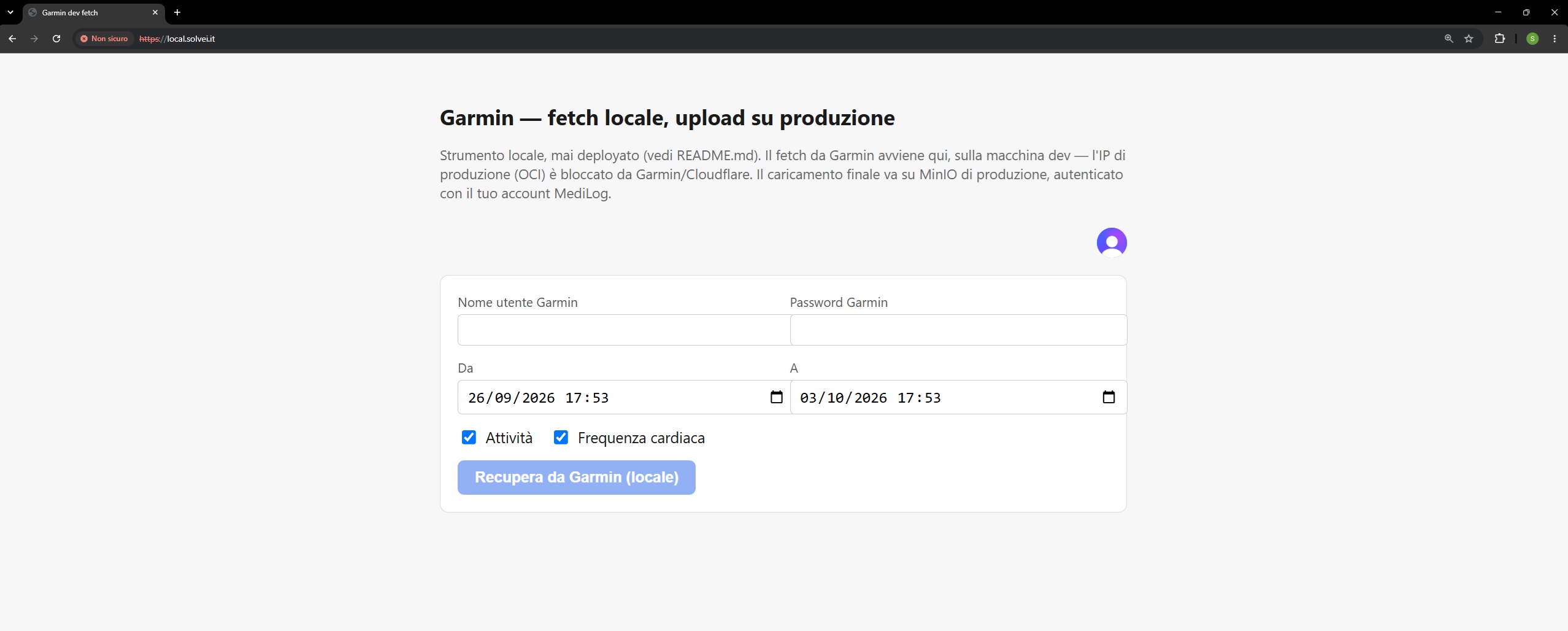
The solution adopted separates where you talk to Garmin from where the final data lives:
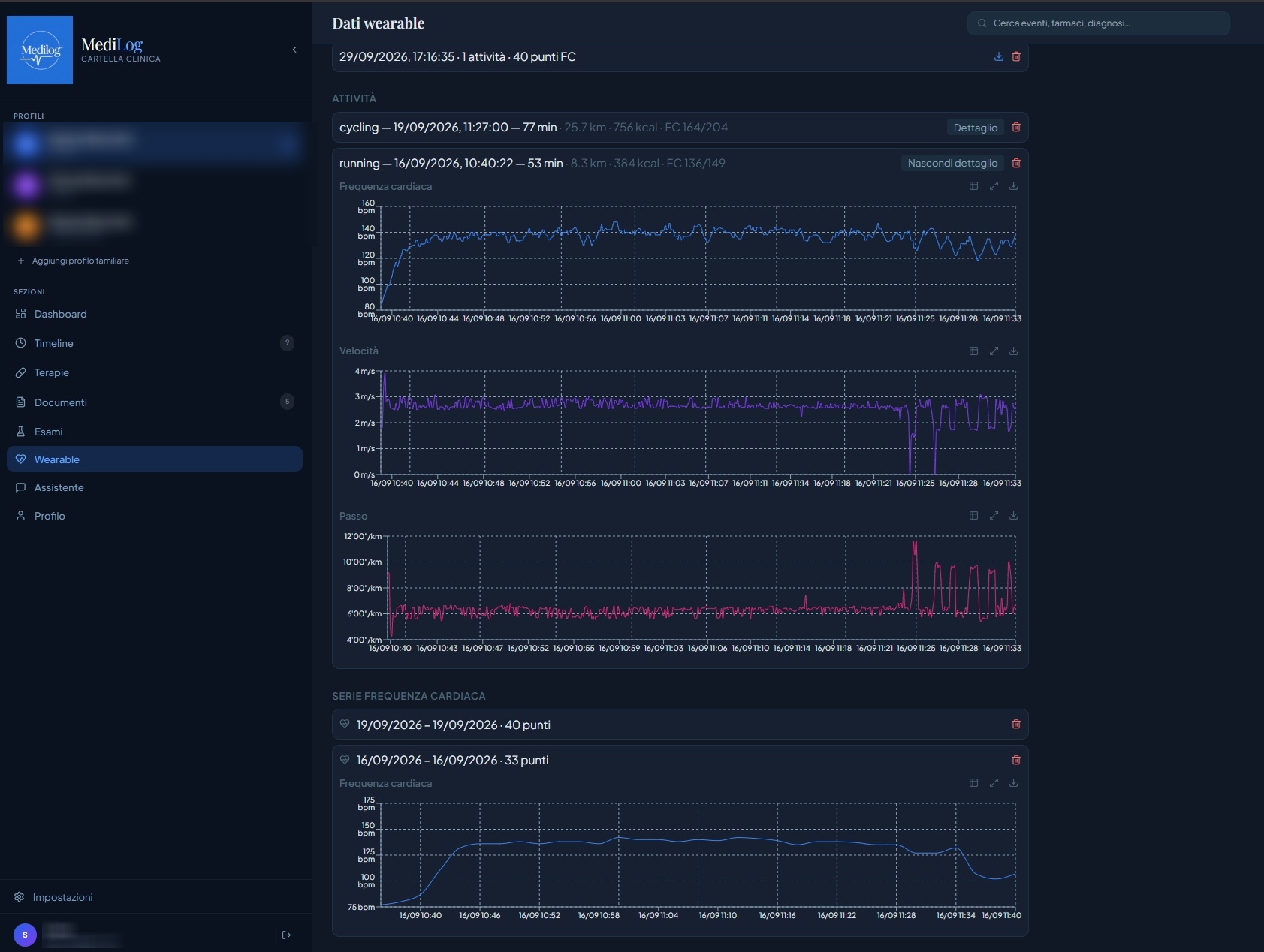
A small standalone Next.js app, meant to run locally on a PC or home network (a non-datacenter IP, never blocked), authenticated with the same production Clerk account. The user logs in with their own Garmin credentials only there; the fetch retrieves activities, heart rate, and, on request for a single activity, fine-grained detail (point-by-point heart rate, elevation, and pace, not just the daily summary).
Staging — a temporary holding area, not the data's final destination: the result (a JSON file) gets uploaded, with the logged-in user's token, to a dedicated MinIO bucket in production — no Garmin endpoint is ever called from the production server. MinIO is the open-source object-storage service (compatible with the same API as Amazon S3) we already use to store documents and attachments; here, though, it's purely an intermediate holding spot, not a permanent data store. The files actually expire on their own after 7 days, precisely because this area isn't meant to keep anything long-term — just to let it pass through on its way to the real import.
Inside MediLog, a new section lists the user's staged files and reuses exactly the same preview component and the same save endpoint already built for lab reports — no duplicated import logic.
Direct fetch from the server
- Garmin login run from the OCI datacenter's IP
- Blocked on every strategy tested (429 / 403)
- No data ever retrievable in production
Local fetch + MinIO staging
- Garmin login run from a residential/dev IP, never blocked
- Same self-service UX, with one extra step
- Garmin credentials never seen by the production server
Imported wearable data now also shows up in the patient's clinical Timeline, interleaved with real events (not just in its own dedicated tab) in a distinct color, so that a workout or a heart-rate session can be read in context with everything else — a visit, a report, a document uploaded around the same time.
Bringing a videodermoscopy exam that was built to stay locked into MediLog
The second problem is different in shape but identical in substance: a real piece of clinical data, already sitting on the patient's disk, trapped inside a format and an application with no standard way out. Before getting into the specific case, though, it's worth understanding what DICOM actually is, and why it's that particular standard — not just any image format — that makes the difference.
What a DICOM file actually is
DICOM (Digital Imaging and Communications in Medicine) is the international standard — in use since 1993, maintained by the US association NEMA — that practically every piece of medical imaging equipment uses to produce and export its data: CT scanners, MRI machines, ultrasound, mammography, and, as in this article's case, even a clinical camera. It isn't “an image format” the way JPEG or PNG are: it's a container that inseparably binds pixels to a block of structured clinical metadata — who the patient is, which exam the image belongs to, which series within that exam, what equipment and parameters it was acquired with, and when. The file knows on its own who and what it belongs to, with no need for an external database to keep the books for it.
A JPEG photo is an island: to know whose it is, which visit it belongs to, whether it's part of a series of related images, you always need an external system to remember that for it. A DICOM file carries that information with it — patient, study, series, instance, visit date (and more). This isn't a technical detail for specialists only: it's the difference between data that can travel on its own to any standard-compliant system, and data that stays trapped inside whatever database (or software) created it.
Beyond the container itself, DICOM also defines a network protocol for exchanging data between different systems: sending a study to an archive, querying it, pulling it up in a viewer. That archive is called a PACS (Picture Archiving and Communication System) — the system that, in every radiology department or digital health record like MediLog, centrally stores all imaging studies and makes them available to the viewers that need to display them (in MediLog, that's Orthanc). It's the same language that lets a CT scan done in one hospital be opened, read, and measured in another, on software from a completely different vendor than the one that did the acquisition. Interoperability isn't an optional extra of the standard — it's the reason the standard exists.
JPEG, PNG, any ordinary image file
- No native link to patient, exam, or series
- Always needs an external database to supply clinical context
- Every vendor organizes its own files its own way
- Zero portability across different systems/software
DICOM
- Patient, study, series, and instance inside the file itself
- Readable by any standard-compliant viewer
- Same language used by CT, MRI, and ultrasound from every vendor
- Explicitly designed to move between different PACS systems
An exam in DICOM format stays readable ten years from now, on software different from whatever acquired it, at a facility different from the one that produced it — a second opinion, a change of doctor, a transfer of care don't require “converting” anything. An exam locked in a single vendor's proprietary format, by contrast, stops being genuinely usable the moment that specific software is no longer available, updated, or simply within reach — exactly the situation described in the rest of this section.
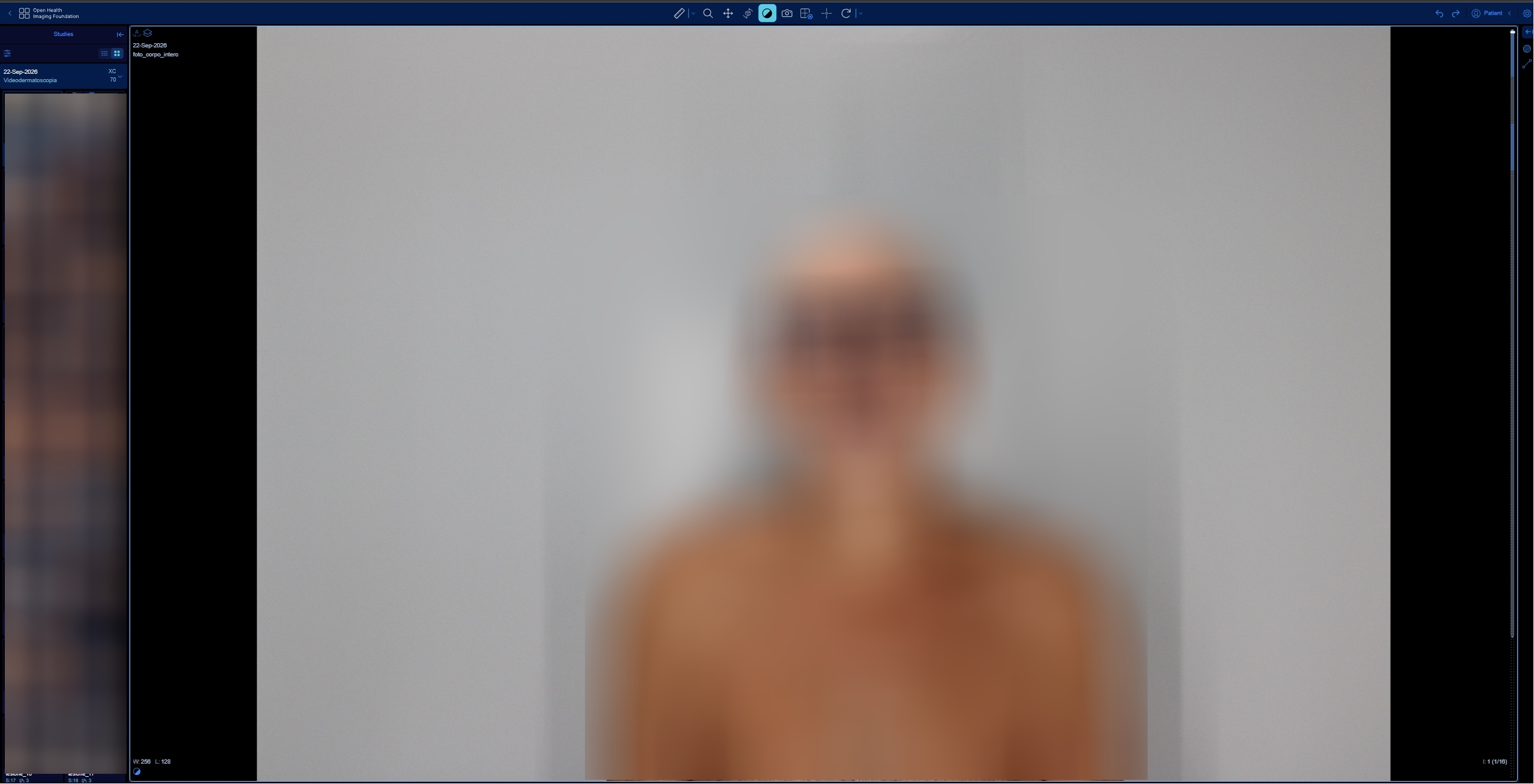
MediLog uses Orthanc as its PACS for DICOM studies, and OHIF as its built-in viewer. Orthanc is a lightweight, open-source PACS server designed specifically to be self-hosted: it receives, archives, and serves every patient's DICOM studies, exposing the standard APIs (query/retrieve) that any compliant viewer knows how to query — it's the central warehouse that every exam, whatever its origin, ends up resting on. OHIF (Open Health Imaging Foundation), on the other hand, is the viewer: the program — also open-source and web-based — that actually displays and lets you navigate a study stored in Orthanc, with zoom, scrolling through a series' images, and measurements, built directly into the MediLog page instead of being a separate app you'd open on the side. To bring in anything that isn't already native DICOM (clinical photos, scanned reports saved as images, captures from devices that only speak their own proprietary format) we built a dedicated tool, dicom_manager: a standalone Streamlit app that reads, displays, edits, and above all creates DICOM studies out of plain JPEG images, with a multi-step save flow specifically designed to never touch the originals.
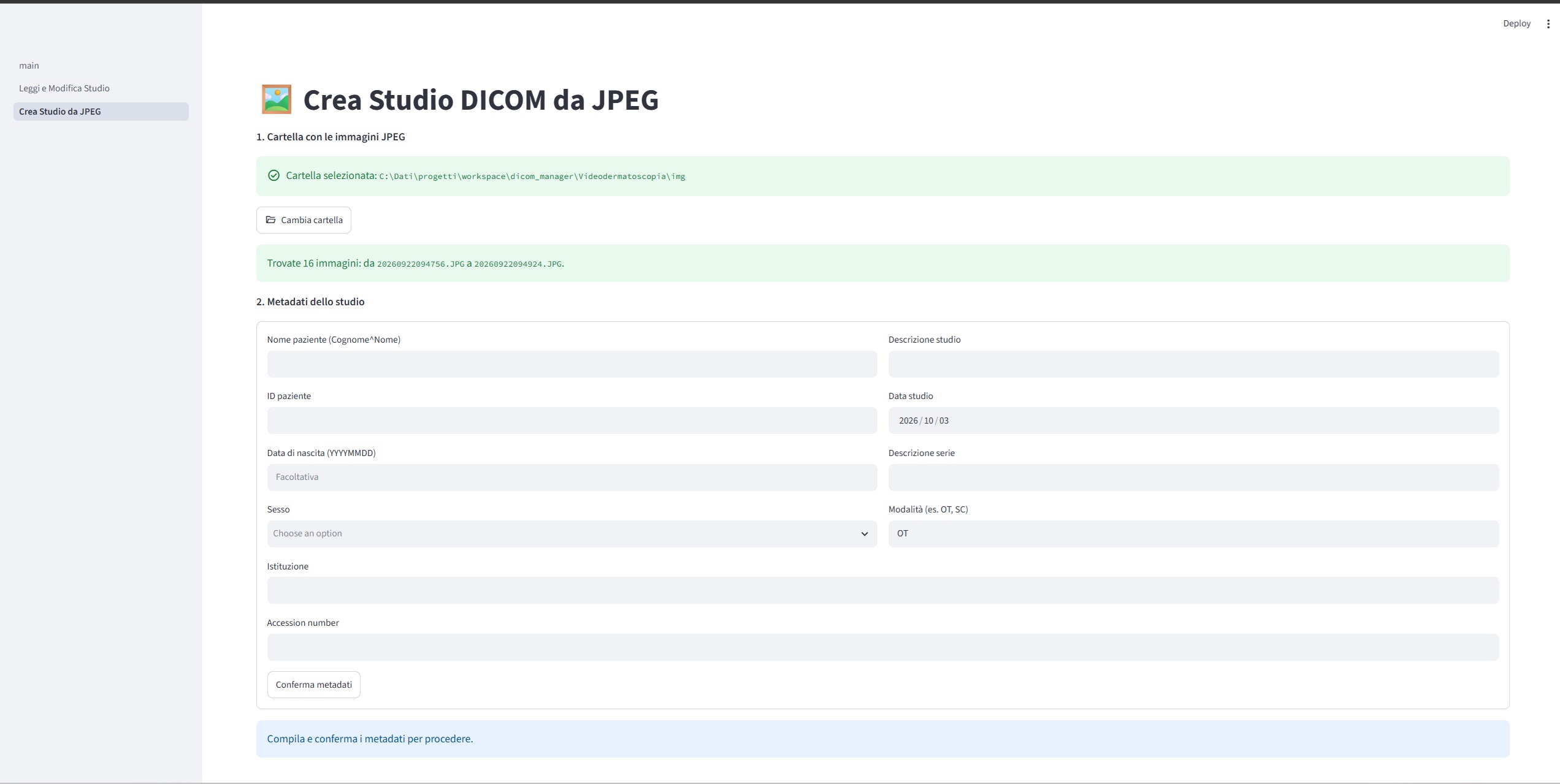
The concrete case: a videodermoscopy exam locked inside DermaGraphix
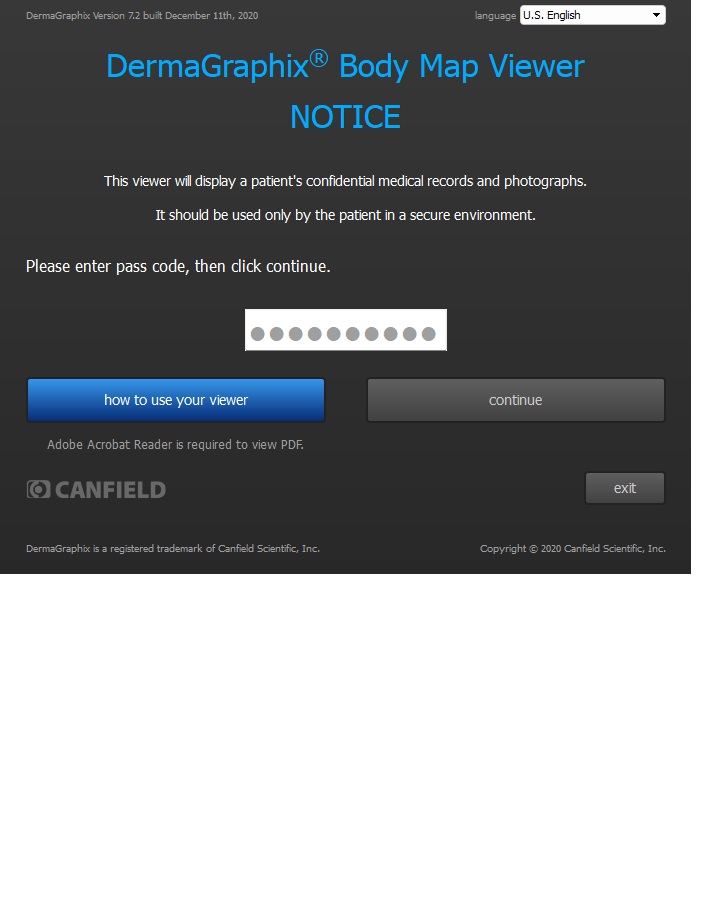
The dermatology practice that performs mole-mapping (total-body photography plus close-up dermoscopy of lesions tracked over time) doesn't normally hand over the images at all: at most, if the patient explicitly asks, it provides a portable copy of the vendor's software — Canfield DermaGraphix (the commercial name for the VECTRA platform) — to review them with, protected by a personal password. No “export” button anywhere in the interface.
Inside the patient's folder: a standard DSLR camera produces 16 full-body
photos in perfectly ordinary JPEG, readable by anything. But the automatic
lesion-detection algorithm saves over a thousand candidates per photo inside
JSON files (with the crops embedded as base64), the
clinically confirmed lesions live in a separate SQLite
database, and the actual dermoscopic images — the ones captured with
the close-up probe — are saved in a proprietary binary container
(.t2k) with no recognizable JPEG or PNG signature at all:
unreadable by any standard tool.
Three different formats, none of which exposes an image you can simply open — except, of course, inside the software itself. The only way to actually see a dermoscopic image was to let the viewer render it and capture it from there.
Querying the database, instead of guessing
Before getting to the screen-scraping part, though, I needed to know which
images to capture. The software only shows the lesions the dermatologist
confirmed — a far smaller number than the thousands of raw algorithmic
candidates. Querying the software's SQLite database directly (with Node.js's
native node:sqlite module, read-only) revealed the real schema:
a LESION table holding the tracked clinical lesions, and a
LESION_IMAGE link table tying each lesion to its body-wide
context photo and, where one exists, to its dedicated dermoscopic capture.
That made it possible to know in advance, without opening anything by eye, exactly which lesions actually had a dermoscopic image attached and which didn't — saving pointless capture cycles and turning the final check into a targeted verification instead of a blind hunt.
When the only API is the GUI
With no export function at all, extracting the dermoscopic images turned into UI automation: an AI assistant drove the Windows application directly — focusing the right window, typing each lesion's number into the search field, waiting for the image to load, and capturing the screen — once for every clinically tracked lesion, verifying each capture by checking the expected number against the label the software actually displayed.
Not a script that “reads” a file: a sequence of simulated clicks and keystrokes, with all the usual headaches of GUI automation — focus drifting back to the terminal instead of staying on the app window, the process name changing after login, a search field that sometimes “fires” before typing is even finished. Every snag was fixed with an explicit wait or the right check, not by throwing a longer timeout at it and hoping.
The whole process ran on the patient's own external drive, using viewer credentials the patient provided themselves, with not a single byte leaving that machine toward any external service.
From extracted images to a real DICOM study
With the images finally in hand as plain JPEG files, dicom_manager
came into play — not its Streamlit interface, but the underlying
library (dicom_lib/convert.py), called from a dedicated script
written for the occasion. The generated study faithfully mirrors the clinical
structure of the session:
- one series with the full-body photos, in the order they were taken;
- for each tracked lesion, its own series with the context crop, the screenshot of its location on the body, and — when available — the close-up dermoscopic image;
- a single shared
StudyInstanceUID, so every series stays grouped as one exam in the viewer.
The original JPEGs are embedded exactly as they are, with no re-encoding: the
same quality as the originals, at a fraction of the size of an uncompressed
DICOM (the sample study goes from about 1.3 GB down to about
126 MB). The modality assigned is XC — external-camera
photography — the one best suited to clinical photos and dermoscopy
that aren't native DICOM acquisitions.
Closed format, a single viewer
- Images openable only with the vendor's own software
- Data scattered across SQLite, JSON, and a proprietary binary container
- No link to the rest of the patient's medical history
Standard DICOM study in Orthanc
- Openable in OHIF like any other DICOM study
- One multi-series study, structured by lesion
- Visible alongside the patient's reports, events, and timeline
The generated study was read back and verified with dicom_manager's own scanning tools before it ever touched Orthanc, then imported into MediLog's shared PACS through the idempotent upload already in place for DICOM documents — no special import path: from that point on, it's just another study.
One container, always with you
Both stories above are, underneath, the same problem seen from two different angles. Normally a patient carries their medical history around in scattered pieces: a USB stick with a CT scan's images and its own dedicated viewer, a CD from some other exam that needs yet another program, PDF reports scattered across emails and phone folders, and maybe — as in the case told in this article — a copy of some specialist's proprietary software, usable only there, only with that password, only for as long as that program keeps working on your own computer.
Instead of carrying around all these different media and formats, have a single digital container, reachable from any device at any time, where every exam — whatever its origin — ends up converted into a standard, interoperable format, readable today and in ten years, by MediLog itself or by any other compliant system. The DICOM conversion work described above isn't an academic exercise: it's exactly the mechanism that lets an exam born to stay locked become part of that container.
That same container, though, isn't meant only to receive documents produced by a doctor or a facility. It's also meant to let the patient themselves — or a family member looking after them — add their own observations, collected with whatever tools they already have at home: a blood-pressure monitor, a smart scale, a glucometer, a sports watch like Garmin. Not notes kept separate from the rest of the record, but real observations, with the same level of structure and the same safety flow (preview, confirm, nothing saved blindly) already reserved for lab reports.
That's the thread tying the two stories together: the Garmin integration isn't “one more feature” bolted on separately, and the DICOM conversion isn't just a technical interoperability problem — they're two different doors onto the same goal: a single medical record the patient genuinely always has with them, instead of having to rebuild it every time from a drawer full of CDs, USB sticks, and different passwords.
Vibe coding: throwaway tools, tailor-made
There's a technical thread, besides the clinical one, running through both stories in this article: none of the tools described — the script that generates the DICOM study from the videodermoscopy data, the automation that drove the DermaGraphix interface, the small standalone app for the local Garmin fetch — was written by hand, line by line. All of them were built together with an AI assistant, describing the specific problem in words and letting the model produce — and in some cases even directly run — the necessary code.
This way of working has a name, vibe coding, coined in February 2025 by Andrej Karpathy (a computer scientist, among OpenAI's founders and formerly Tesla's AI director): a few sentences describing what you want, used as a prompt for a language model tuned for programming, and letting it write — and often run — the code itself.
Vibe coding doesn't stop at the minor tools described above: it's the same method MediLog itself was built with, and the same one the entire solveiAgents platform hosting it grew out of — the orchestrator, the individual specialized agents, the infrastructure holding it all up. It isn't a marginal detail good only for throwaway scripts: it's how the code a patient uses every day was written too, from the start.
But be careful not to read this as “just describe the idea and the rest follows on its own.” For a small, isolated tool — a script that pulls 19 images out of a SQLite database, used once and thrown away — creativity really can be enough: the damage from a mistake is contained, and you can tell right away whether the result is what you wanted. Building an entire platform like solveiAgents is a different problem. Separate containers for every agent, shared services reused everywhere (centralized logging, backups, queued job scheduling, an orchestrator deciding what to turn on and off and when), real clinical data that can't afford a silent bug: getting to an architecture that actually holds up takes solid computer-science fundamentals — not optional, but required — together with a concrete understanding of what an AI model is actually good at, and where it still needs to be checked line by line.
What stays constant across both cases, small and large, is creativity: the ability to imagine the tool you actually need before it exists, and to describe it precisely to whoever — or whatever — has to build it. The same creativity it takes to notice that Garmin data blocked by Cloudflare, or a videodermoscopy exam locked in proprietary software, aren't insurmountable obstacles but problems you can work around, one piece at a time. At the scale of an entire platform, though, that creativity alone isn't enough: it has to rest on real technical skill to become a system that actually works, not just a prototype that looks like it does.
Two different stories, the same underlying lesson: in a system that truly puts the patient at the center, clinical data can't stay a prisoner of whoever generated it first — whether that's a cloud API that doesn't trust your IP, or a viewer with no “export” button anywhere. Sometimes a different endpoint is all it takes; sometimes you have to watch the software watch your own data, one click at a time.