From classic computer vision (classification, detection, segmentation, pose estimation) to what an ordinary webcam can do today with open-source models like MediaPipe: two projects actually built — the virtual Theremin (hand pose estimation, inspired by the 1920s instrument of the same name) and EmoLens (facial emotion and micro-expression recognition based on FACS) — and a third project, CourtIntelligence, that for now exists only as a plan.
Before real-time deep learning: classic computer vision
Computer vision is the branch of artificial intelligence that lets machines process, analyze, and understand images and video — a field of research much older than today's generative AI and multimodal LLMs. Before getting into the two projects we actually built — the virtual Theremin (a form of pose estimation applied to hands) and EmoLens (a form of classification applied to facial micro-expressions) — it's worth looking at the full map of tasks this field tackles: both projects are, at bottom, specific cases of this broader taxonomy.
Tasks on a single image
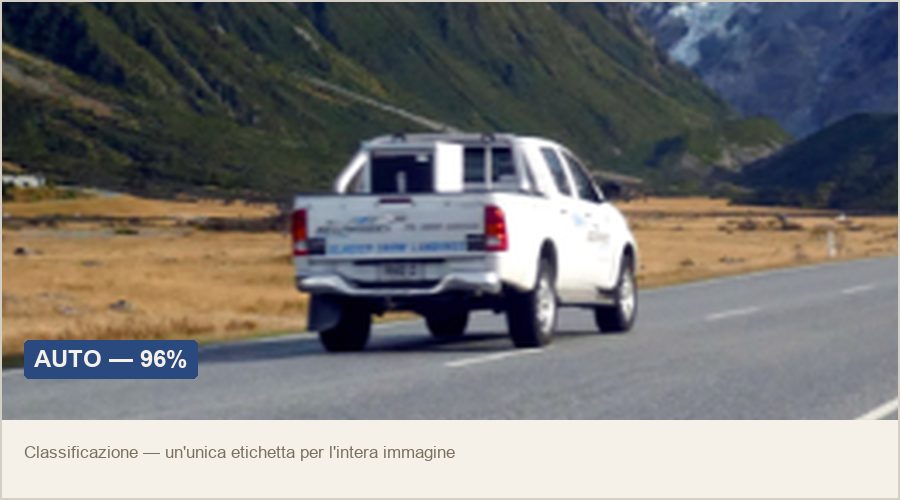
"What's in this photo?"
Assigns a label to an entire image, chosen from a predefined set of classes (e.g., "person," "car"). It's the simplest task, and the first one where convolutional networks beat human performance — a decade before transformers.
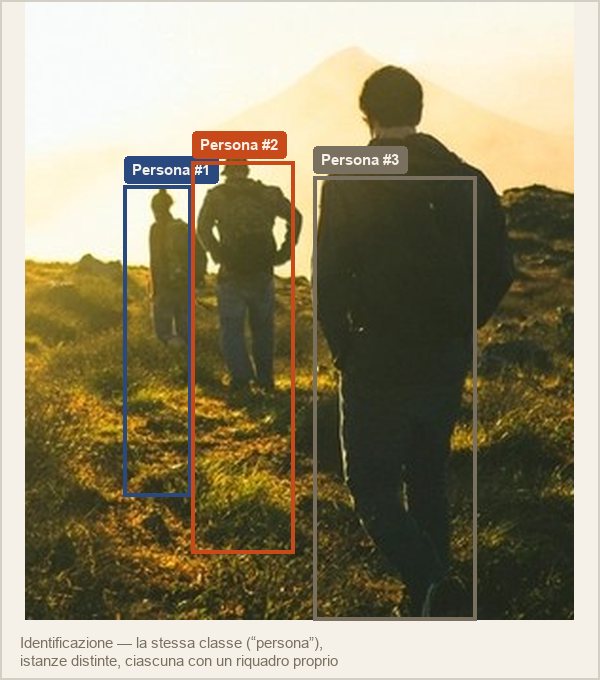
"Who is this person?"
Recognizing "this is a human face" (classification) isn't enough: you need to recognize which specific instance of that class it is — this particular person, not someone else. It's the foundation of facial recognition.
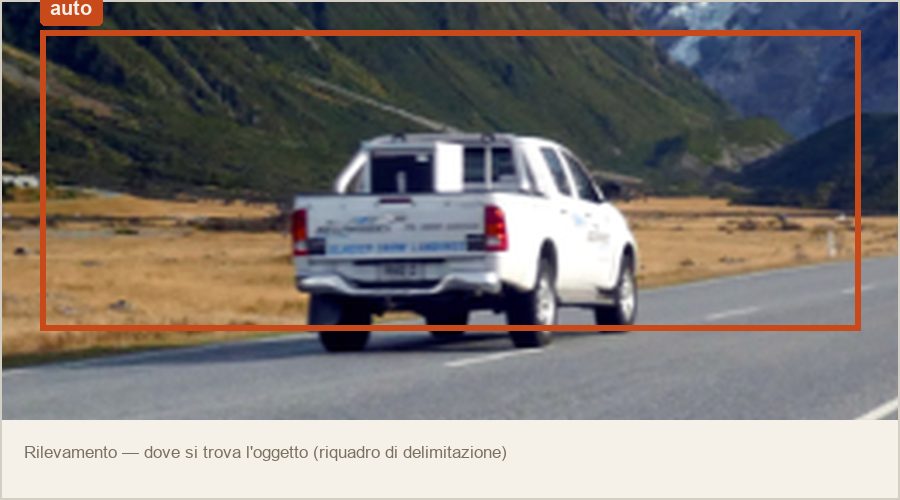
"Where exactly is it?"
Locates one or more elements in an image with a bounding box. It's often a preliminary step: detecting a face before analyzing it, or a damaged part before classifying the fault. It's the central task behind tools like YOLO and Detectron2.
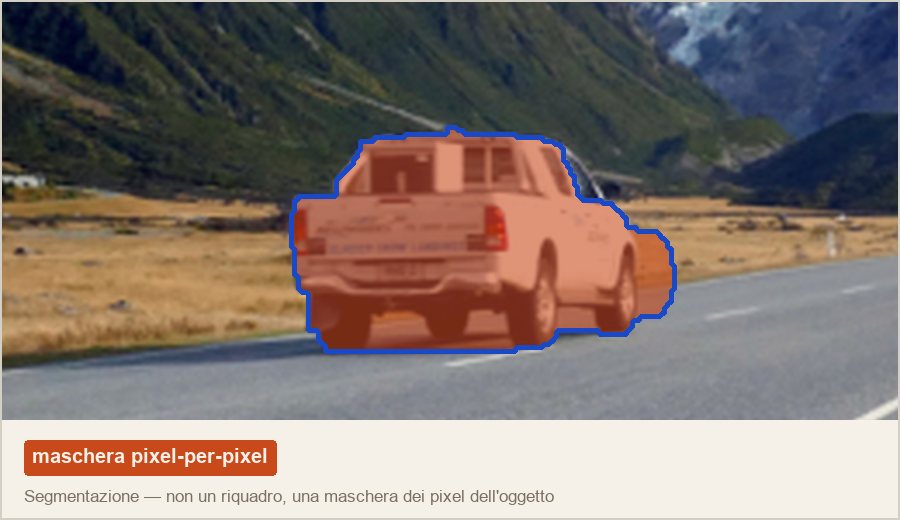
"Which pixels, exactly?"
Not a box but a pixel-by-pixel mask. Semantic segmentation returns one mask per class (every "car" pixel); instance segmentation returns a separate mask for each individual car recognized — a task where neural networks are still nowhere near the precision of the human brain.
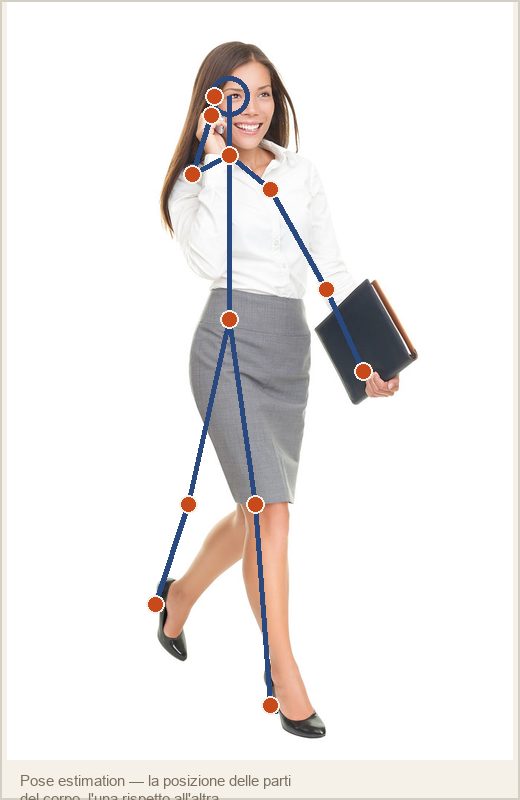
"How is it oriented or positioned?"
For rigid objects, their position and orientation in 3D space relative to the camera (useful in robotics). For human bodies, the position of body parts relative to each other — exactly the task MediaPipe Hands solves for our Theremin, just applied to hands instead of the whole body.
Tasks on a video stream
Computer vision doesn't stop at a single image: some tasks require looking at a whole sequence, not frame by frame, to account for temporal consistency. Tracking locates a specific element throughout the entire video stream — it could be done by running detection on every single frame, but it's far more efficient to use the results from previous frames to predict the next position, exploiting the continuity of motion. Action recognition goes further: recognizing a gesture or movement (dancing, drawing a circle) requires, by definition, a continuous sequence, in the same way you can't understand a sentence from isolated, scrambled words. It's the principle behind the debouncer we use in the Theremin to confirm a closed fist only after a few consecutive frames, not from a single isolated one.
The same tasks, a completely different interface
Until just a few years ago, each of these five tasks required its own dedicated model, trained on a dataset specific to that task. Multimodal LLMs change the interface: a single model, a natural-language prompt, and the answer comes back as free text instead of a structured class/box/mask. In solveiAgents (https://blog.solvei.it/en/blog/solveiagents-medilog.html) this translates into two agents — agent-image and agent-medical — that interpret the content of any image on request, with no model ever trained specifically for that task. Three real examples, taken from the platform's everyday use.

No predefined class, no bounding box: the model describes subjects, background, dominant colors, composition, and even the legible text on a sign in the corridor — a task that, until just a few years ago, would have required combining at least four specialized models (person detection, color recognition, OCR, depth estimation).
Main subject
Foreground (left): a woman with blonde hair pulled into braids, wearing a dark blue nurse's uniform, ID badge visible. Seated at a table, right hand on the computer keyboard, the other resting on her chin in a reflective gesture. On the table: scattered documents, a monitor showing medical data, a landline phone, pens.
Center: a man with dark hair, wearing a light blue nurse's uniform, walking to the right while holding a sheet of paper.
Right (foreground): a woman with short gray hair, wearing a teal uniform, pushing a medical cart full of packages and documents, tablet in hand.
Background
The corridor stretches into the distance, lit by fluorescent lights. On the left wall, a sign reads: "Cardiology Outpatient Clinic / Surgery Ward." In the background, more people in medical uniforms and a man in a dark suit and tie, likely administrative staff.
Dominant colors
Clinical tones — blues, greens, grays, whites — with the uniform colors (dark blue, light blue, teal) standing out against the neutral tones of the walls and floor. The white fluorescent light adds to the cold atmosphere typical of a hospital setting.
Composition
A deep-perspective composition, with the foreground table area as the focal point while the corridor stretches back to create depth. The three subjects are distributed dynamically: work activity, movement, operational action.
Readable text
On the sign: "Cardiology Outpatient Clinic / Surgery Ward," clear and well visible. No other relevant text elements (nothing legible on the screen or documents).
Relevant elements
Medical and administrative objects (cart, monitor, documents, pens); a typical clinical setting (fluorescent lighting, neutral walls, long corridor); dynamic human movement reflecting the everyday activity of healthcare professionals.
The same agent also lends itself to a more unusual use — handwriting analysis of a handwritten note:
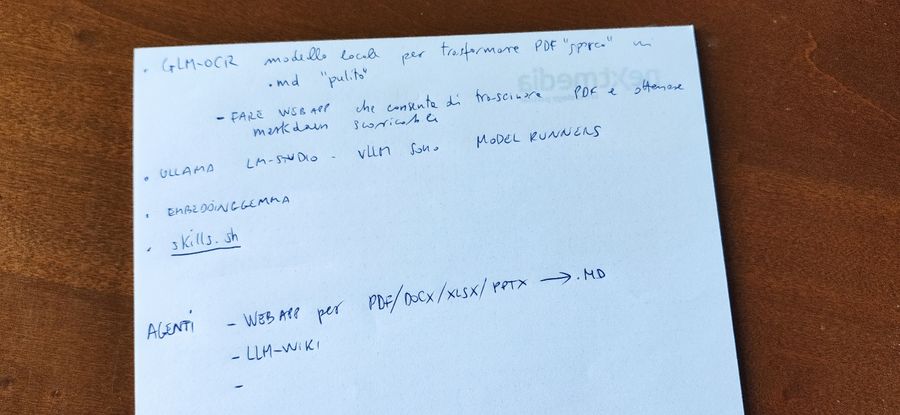
Image description
A sheet of white paper, likely from a notepad, resting on a dark wooden surface. The text is handwritten in black ink: a bulleted list of technical notes, dominated by computing terms and acronyms.
Pressure
Observation: consistent and medium, with no strong variation in stroke thickness, except for a few lighter final strokes.
Interpretation: emotional balance and rational control, no sign of aggressive impulsiveness or extreme fragility.
Size
Observation: medium-sized handwriting, tending toward compactness especially in technical words ("GLM-OCR", "LM-STUDIO").
Interpretation: an adaptable person, with a sense of measure, who prefers efficiency over theatrics.
Slant
Observation: mostly vertical, with slight rightward drift in a few words.
Interpretation: reason dominating over emotion — a trait typical of analytical, goal-oriented people.
Rhythm and regularity
Observation: fast, functional rhythm; letters not perfectly formed but consistent, with some strokes simplified to speed up writing.
Interpretation: a fast, pragmatic mind, prioritizing content and speed of capture over aesthetic form.
Letter connections
Observation: letters loose or intermittently joined, a "hybrid" style between print and cursive.
Interpretation: synthetic thinking, intelligence that proceeds in logical blocks rather than continuous emotional flow.
Margins and spacing
Observation: left margins respected but irregular; wide, airy spacing between lines, variable between words.
Interpretation: a schematic working method, a habit of leaving room for future additions — typical of someone who plans technical processes.
Summary profile
A profile strongly oriented toward rationality, pragmatism, and efficiency: an analytical mindset, used to handling complex flows of information. No room for ornamentation or surface emotion — a technical/professional profile, disciplined but fast, capable of synthesis, with strong self-control.
Extracted text (OCR)
BUILD WEB APP that lets you drag a PDF and get scrollable markdown
OLLAMA LM-STUDIO - VLLM are MODEL RUNNERS
EMBEDDING GEMMA — skills.sh
AGENTS - WEB APP for PDF/DOCX/XLSX/PPTX → .MD — LLM-WIKI
agent-medical applies the same principle in a clinical setting, with a different model and a system prompt oriented toward image-based diagnostics:
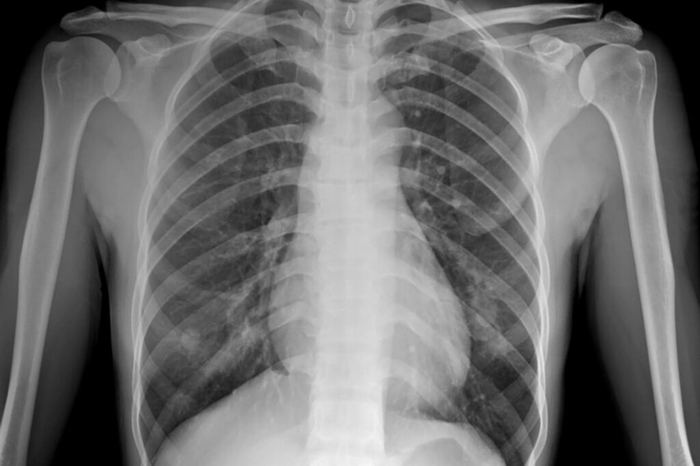
Image description
Location: chest, anteroposterior (PA) view.
Morphology: complete bone structure (scapulae, clavicles, ribs) with well-defined margins; heart centrally positioned, normal cardiothoracic ratio (≤50%); lungs show segmental opacities in the lower right and left areas, suggesting parenchymal infiltration.
Margins: the opacities have irregular, poorly defined borders, typical of inflammatory processes.
Relevant clinical signs
The presence of segmental opacities and focal distribution suggests an infectious process, such as pneumonia. No signs of pleuritis (no costophrenic blunting), pleural effusion, or pneumothorax.
Differential diagnosis
Bacterial pneumonia (e.g., Streptococcus pneumoniae) — typical segmental opacity, focal distribution, common in the lower lung fields.
Pulmonary tuberculosis — would require further tests (tuberculin test or CT) to confirm or rule out.
Chronic inflammation (severe asthma or a respiratory inflammatory syndrome) — usually associated with persistent symptoms, not opacities this pronounced.
From a stream of pixels to meaning
A webcam, on its own, doesn't "see" anything: it captures a stream of numbers — thirty times a second, a million pixels at a time, each with three color values. The interesting work starts afterward, when that stream of numbers gets turned into something that means something to a person: this is a hand, it's pointing there; this is a face, and it's about to really smile — not just with the mouth.
In recent years this step — from pixels to meaning — has become accessible to anyone with a laptop, thanks to a handful of mature open-source libraries that do the dirty work (detecting a face, tracking a hand skeleton, estimating a pose) and leave the rest of the code to decide what to do with it. This article tells the state of the art of these tools through three concrete projects born in-house: one already played live, one already in production, and one that for now is only a very detailed plan written in a Markdown file.
What an ordinary webcam can see today
Simplifying quite a bit, face/hand/body-based visual recognition splits into two families of problems, often confused with each other but conceptually very different. The first is geometry: where, in space, are the points that make up a hand, a face, a skeleton — coordinates, distances, angles. The second is semantics: what that geometry means — is this configuration of facial muscles a genuine smile or a polite one, is this wrist movement a smash or a lob. The two most mature open-source tools available today cover, not by coincidence, exactly these two families.
MediaPipe
- 468 points on the face (Face Mesh), 21 per hand (Hands), 33 on the skeleton (Pose)
- Ultra-lightweight models (BlazeFace/BlazePose), designed to run in real time on CPU
- Runs in the browser via WebAssembly + WebGL — no server needed
- No notion of "emotion" or "intent": just coordinates
py-feat
- Detects facial Action Units (intensity per individual muscle) and emotions
- Wraps several pretrained neural networks (RetinaFace, AU regression models)
- Born in academia (Dartmouth) to implement the FACS methodology
- Heavier: designed to run on a server, not in the browser
Until just a few years ago, a decent facial-recognition pipeline required a server with a GPU and a paid proprietary model. Today MediaPipe runs in a browser tab on anyone's phone, and py-feat automates a task that, until the 2000s, required months of specialized human training (more on that later, when we get to FACS). The leap isn't just in performance: it's in accessibility.
The virtual Theremin: playing thin air with a webcam
The first project we built in SOLVEI's "technology gym" is a prototype that turns the movement of hands in front of a webcam into sound, digitally recreating one of the strangest and most fascinating musical instruments ever invented — the theremin. To understand why it's a perfect case study for talking about gesture recognition, you first have to tell the story of who invented it: because the inventor's story is, almost literally, more incredible than his instrument.
Lev Termen, the man who played thin air
Lev Sergeyevich Termen — known in the West as Léon Theremin — was born in St. Petersburg in 1896. He studied physics and, in parallel, cello: a combination that would prove decisive. In the early 1920s, while working on proximity sensors to measure gas density, he noticed a curious side effect: bringing a hand close to a high-frequency oscillating circuit changed the frequency itself in an audible way. Instead of treating it as background noise, he built a musical instrument out of it.
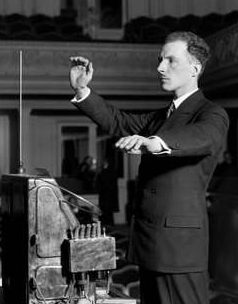
The principle is elegantly simple: two antennas, a vertical one controlling pitch and a horizontal loop controlling volume, each wired to a radio oscillator. As the performer's hand moves closer or farther away, it alters the circuit's electrical capacitance and therefore the frequency generated; two nearby oscillators produce, through heterodyning, an audible difference frequency. The result is often called the oldest electronic musical instrument still played today, and it's certainly the first one designed to be played with no physical contact at all — pure gesture in space, captured by an electromagnetic field instead of a microphone or a keyboard.
Termen builds the first theremin in Petrograd. He demonstrates it to Lenin himself, who — according to tradition — manages to play Saint-Saëns's "The Swan" on his first try and embraces him enthusiastically.
European tour, then a move to New York. The patent is licensed to RCA. Termen founds a company, invents the Terpsitone (a stage that generates music from a dancer's steps), and, with composer Henry Cowell, the Rhythmicon — considered one of the first drum machines in history.
Buried in debt from the Great Depression and recently married to Lavinia Williams, an African-American dancer (already a scandalous marriage for the segregated New York high society of the time), Termen vanishes overnight. He's recalled — effectively forcibly repatriated — to the Soviet Union, and his wife hears nothing more about him for decades.
Sentenced to forced labor, he's later transferred to a sharashka — an NKVD prison laboratory — where he's forced to put his talent to work for Soviet espionage. He invents "The Thing": a passive listening device hidden inside a wooden replica of the US Great Seal, given to the American ambassador in Moscow in 1945. It sits there, listening, for seven years before being discovered. For this work he receives the Stalin Prize.
Rehabilitated during the Khrushchev thaw, he works at the Moscow Conservatory building new electronic instruments — until a Soviet campaign against "formalist" music puts an end to this chapter too.
Rediscovered by Western journalists after decades of obscurity, he receives a visit in Moscow from Robert Moog — the father of the modern synthesizer, who as a young man built and sold theremins — and travels one last time to the United States, at 95, to see his most celebrated student, Clara Rockmore, again.
Dies in Moscow at 97. His story — physicist, musician, spy, prisoner, rehabilitated — is told in the documentary Theremin: An Electronic Odyssey (1993).
The theremin, in short, is probably the first example of gesture recognition in history — analog, made of antennas and electrical capacitance instead of neural networks, but conceptually identical to what we do today with a webcam: turning a hand's position in space into a continuous parameter, in real time.
The digital version: MediaPipe instead of the electromagnetic field
Our virtual Theremin replaces the two antennas with MediaPipe Hands: the webcam captures the video stream, MediaPipe extracts 21 landmark points for each detected hand (knuckles, fingertips, palm) on every frame, and from those points we compute the same two quantities Termen got from pure physics — a hand-to-camera distance that drives pitch, a second distance (typically thumb-to-index) that drives volume. The instrument's principle hasn't changed in a century; only the way the gesture is captured has.
The first version of the instrument played with a noticeable lag and an annoying mismatch between gesture and sound. The cause wasn't, as first suspected, raw compute power — it was a silently growing backlog of pending frames, because nothing throttled capture when the rest of the system couldn't keep up: every new frame got queued even if earlier ones hadn't been processed yet, and the lag kept growing over time instead of staying constant. The fix (a "frame gate" that drops excess frames instead of accumulating them) is a reminder that the bottleneck in a real-time video pipeline is often not the model — it's the queue sitting in front of the model.
Current version: from prototype to a genuinely playable instrument
After the first live test, the typical limitations of any prototype that works "in theory" showed up: a range of just over six octaves (too narrow for a real piano), a waveform-change gesture that sometimes triggered by accident, and no visual feedback on which note was actually being played. Here's what changed:
A real 88 keys, not 80
From 27.5 Hz (A0) to 4,186.01 Hz (C8) — the full range of an acoustic piano, no longer stopping halfway between E7 and C8. The mapping stays logarithmic: equal steps of hand movement cover the same number of octaves, not the same number of Hz.
Two panels, not one
Webcam and controls separated into two columns instead of a semi-transparent overlay on top of the video — dedicated room for the 88-key keyboard and the note name, legible even in fullscreen.
One fist, read by duration
The initial attempt to add a second gesture ("one finger extended") to toggle continuous/discrete pitch interfered with the existing fist gesture — opening the fist naturally passes through a "one finger extended" state. Replaced with a single gesture, distinguished only by how long it's held: a quick fist cycles the waveform, a held fist toggles continuous/discrete pitch.
Note name and keyboard
In discrete mode the sound snaps to the nearest semitone (12-TET) and the note name appears (C, C#, D…); the 88-key keyboard in the panel highlights the matching key in real time.
Pinch to "freeze" the note
A new gesture on the right hand (thumb-to-index, with two-threshold hysteresis to avoid flickering): holding the pinch closed keeps the sound fixed while the slider and keyboard keep updating as a preview, so you can silently reposition your hand before "releasing" the new note.
No more frame backlog
The perceived lag and the tracking that "kept going on its own" (hands already out of frame, but the backend still busy processing old frames) wasn't a compute-power problem but a missing mechanism to throttle sending when the system couldn't keep up — a frame gate now guarantees at most one frame in flight at a time, as described above.
EmoLens: reading a face like a text
If the virtual Theremin is an exercise in geometry — it cares about the hand's position in space, not the meaning of the gesture — EmoLens, our facial-analysis agent, moves entirely in the territory of semantics: it doesn't just track a face, it tries to understand what that face is communicating. To do that, it relies on a methodology that wasn't born in computer science, but in experimental psychology half a century ago.
FACS: fifty years before neural networks
In the 1960s, American psychologist Paul Ekman, together with Wallace Friesen, tackled a question that sounds simple and really isn't: how do you objectively measure a facial expression, without the observer projecting their own cultural interpretation onto it? Building on the work of Swedish anatomist Carl-Herman Hjortsjö, who in the 1960s had already catalogued the muscles responsible for facial expressions, Ekman and Friesen built the Facial Action Coding System (FACS) in 1978: an anatomical taxonomy of roughly forty Action Units (AUs), each corresponding to the movement of a specific facial muscle or muscle group, entirely independent of any emotional label.
An AU isn't "a smile" or "a disgusted grimace" — it's an atomic muscle movement: AU6 is the cheek raiser, AU12 is the lip-corner puller, AU9 is the nose wrinkler. Recognizable emotions only emerge from the combination of several AUs. A genuine ("Duchenne") smile is AU6+AU12 together; a polite smile is AU12 alone, with no involvement of the eye muscles — the difference between the two, imperceptible to a casual glance, becomes measurable and repeatable.
The reason it's worth measuring these with this much precision is that expressions aren't a passive byproduct of emotion — they do active communicative work: they signal to others how we feel before we even find the words, they anticipate intent (an angry look can precede a confrontation), and they regulate interaction in real time — a smile invites, a furrowed brow warns. And different emotions concentrate in different parts of the face: anger and fear read mostly in the eyes and eyebrows (drawn together and lowered in the first, raised and widened in the second), happiness and disgust mostly in the mouth and lips, while the cheeks — raised only in a genuine Duchenne smile — are the detail that most often separates a real emotion from a performed one.
Ekman didn't stop at the taxonomy: in the same years he ran field studies with the Fore tribe of Papua New Guinea, isolated from any contact with Western media, showing photographs of facial expressions and asking people to match them to emotional situations. The results support the hypothesis — controversial then, still debated now — that a small core of basic emotions is expressed through universal facial configurations, the same across every culture: happiness, sadness, anger, fear, surprise, disgust, and — proposed later by Ekman himself and still debated in the literature — contempt, the seventh candidate expression on the list.
Cross-cultural studies remain open to an obvious objection: even the most isolated communities today have at least minimal visual contact with the rest of the world. A sharper piece of evidence comes from people who have never been able to see another person's face at all. In 2009, psychologist David Matsumoto — a direct student of Ekman's — compared the spontaneous expressions of sighted and congenitally blind judo athletes at the 2004 Athens Olympics and Paralympics, at the exact instant of a match's victory or defeat. The muscle configurations matched — the same eyebrow contraction in defeat, the same lip-corner rise in victory — produced by people who could never have learned those movements by watching someone else's face. If an expression were an imitated behavior, someone born blind simply couldn't reproduce it; the fact that they do is the strongest argument for a biological, hard-wired origin, not a (purely) social one.
The face loses control before the rest of the body does: a genuine emotion, even when someone wants to hide it, leaves a muscular trace — often for a fraction of a second — before the "correct" expression takes over. Ekman and Friesen documented this phenomenon by studying footage of clinical interviews, calling it a microexpression: an involuntary flash, under half a second, that reveals what the dominant expression is masking.
For decades, coding a video with FACS was craft work: becoming a certified FACS coder requires roughly a hundred hours of training and a reliability exam — a huge investment for analyzing just a few minutes of footage. It's exactly this bottleneck that modern open-source tools have eliminated.
From FACS to EmoLens: what we actually built
EmoLens relies on py-feat (Python Facial Expression Analysis Toolbox), an open-source project born in academia that automates exactly the work of a human FACS coder: it detects the face (we use RetinaFace), locates facial landmarks, and uses dedicated neural networks to estimate the intensity of each Action Unit and the probability of each basic emotion. We deliberately don't enable the identity and gaze models py-feat offers — they're never read by the interface, and disabling them noticeably cuts analysis time.
The agent runs in three modes: single image (synchronous analysis), live webcam (over WebSocket, with the overlay drawn in real time on the frontend), and uploaded or YouTube video (an async job). A second, dedicated service, agent-emolens-gpu, running on GPU, pushes past the classic scope of FACS by tackling exactly the phenomenon Ekman had documented in the 1960s: microexpression spotting, that is, automatically detecting the three phases of a fleeting expression — onset (the start of the movement), apex (the peak), and offset (the fade-out) — for each Action Unit, on high-frame-rate video sequences.
Two things worth putting in writing. First: py-feat doesn't recognize contempt, the seventh emotion that part of the post-Ekman literature has proposed adding to the original six — it's a fixed limitation of the library, not ours. Second: the microexpression-spotting heuristic hasn't yet been calibrated against a real dataset annotated by human FACS coders — it works, runs in production with automatic GPU→CPU fallback without dropping a frame, but its quantitative accuracy is still to be validated.
Analyzing faces inevitably touches sensitive data. Here's what's actually in the code, not a list of intentions:
- No persistence. Images, webcam frames, and uploaded videos are processed only in memory or in temporary files and deleted immediately after use. No data is ever stored in the LOCAL Postgres DBMS or MinIO Object Store used at the infrastructure level by solveiAgents, eliminating the risk of data exfiltration.
- No biometric identification. The identity- and gaze-recognition
models (
identity_model,gaze_model) are explicitly disabled in configuration. EmoLens recognizes Action Units and expressions — how a face moves — not who that face belongs to. - Fully self-hosted inference. No calls to third-party cloud services (OpenAI, Google Vision, or similar): analysis runs on our own infrastructure, CPU or company A10 GPU, never on an external API you'd have to send a face to.
- Posture estimation runs in the browser. The PoseOverlay module uses self-hosted MediaPipe via WASM, entirely client-side: for that feature no data ever leaves the user's device.
- Authenticated access only. Every endpoint, HTTP and WebSocket, requires login — a double check, at both the application and reverse-proxy level.
- Deliberately excluded from the daily backup. Not an oversight: if nothing is kept, there's nothing to save and nothing that could ever resurface later.
On the regulatory side, two concrete points. The AI Act (Art. 5) bans emotion recognition in the workplace and in educational institutions, except for narrow medical or safety exceptions — a limit on use, not on the technology: EmoLens isn't meant for those contexts. The GDPR (Art. 9) only treats data as a "special category" biometric when it's processed for the purpose of uniquely identifying a person — disabling identity/gaze isn't therefore just a performance choice, it keeps the processing below that stricter threshold.
CourtIntelligence: from faces to the playing field
The third chapter of this story exists only on paper — a design document, not a line of working code. It's still worth telling, because it shows clearly where this same toolbox naturally leads once it's pointed not at a face but at a playing court: CourtIntelligence, an agent meant to extract statistics from a video (offline, uploaded or by URL) of a beach tennis or padel match — distance covered, player and ball speed, shot count by type.
The plan, in its most recent version, combines tools we've already met in this article with others specific to the sports domain: YOLOv8 + ByteTrack for multi-player tracking, a pretrained model for the ball (the hardest target — small and extremely fast), a homographic projection to convert pixels into real-world meters, a causal Kalman filter to smooth trajectories, and — here MediaPipe makes a comeback — pose estimation, but only in the narrow time window around a detected contact, to classify the shot (forehand, backhand, smash, lob, drop shot, volley, serve) with simple rules, not a purpose-trained model.
An interesting design choice in the plan is that the overlay — boxes around players, ball trajectory, live stats — is meant as structured data drawn on a transparent canvas, not "burned into" the video: the same component works identically both during live analysis (data arriving over WebSocket as the computation proceeds) and in the final replay dashboard. The heavy computation is also meant to run on-demand on a dedicated GPU VM, which powers on when analysis starts and shuts itself down after a period of inactivity — the same pattern already proven for the orchestrator's shared GPU.
CourtIntelligence has never moved past the design stage: no container, no pipeline code, no database migration. The plan exists as a detailed design document — agent name, database schema, known technical risks (the ball-detection model isn't chosen yet, shot classification isn't calibrated on real footage) — ready to be picked up, not something to assume is already done.