


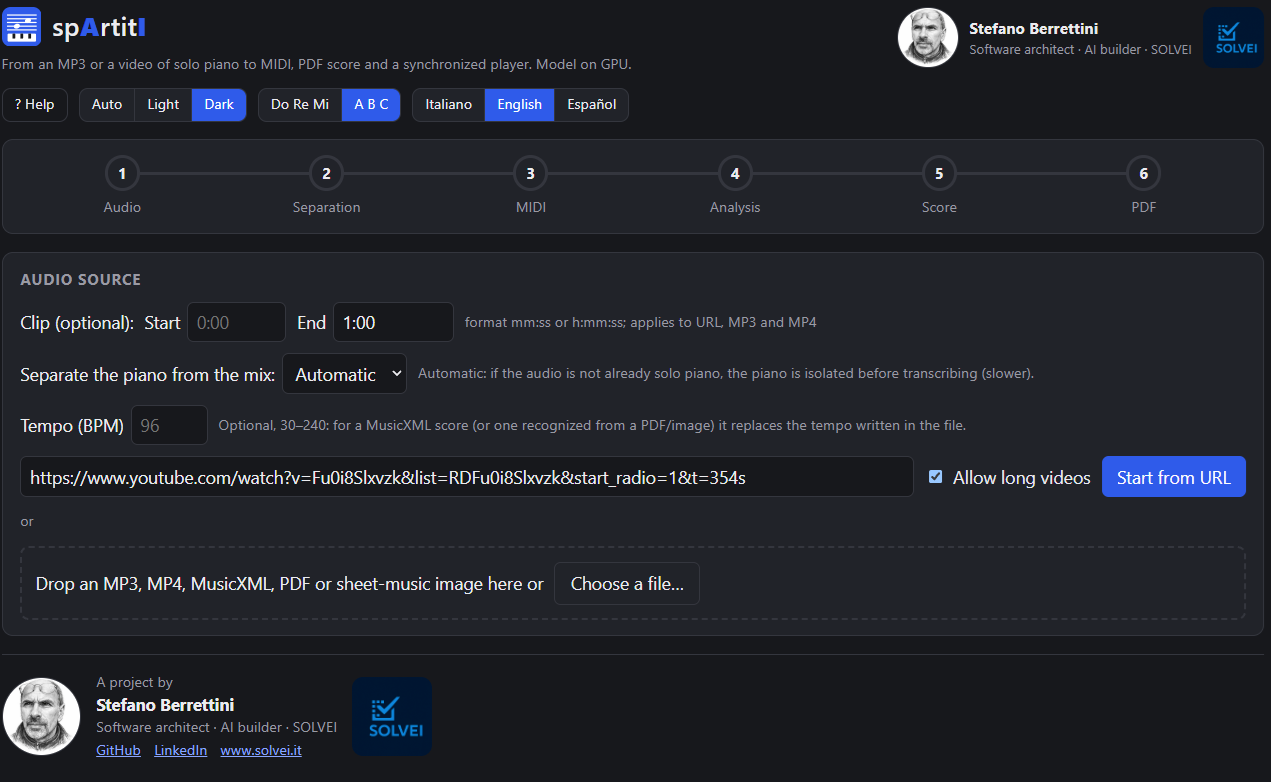
spArtitI is a (web)app (Python/FastAPI and Next.js) built on open-source software that turns the URL of a YouTube video, an MP4 or an MP3 of piano music — solo or in a mix, even just a short excerpt — into an MP3, MIDI, MusicXML and a PDF with proposed fingering. The sequence of operations it runs is: audio extraction with yt-dlp and FFmpeg, optional piano separation with Demucs, transcription with Transkun, score with music21 and PDF with MuseScore 4. On a real 6.7-minute piece the pipeline takes about 100 seconds on an RTX 4070 GPU with 8 GB of VRAM, and about 3.5 times longer on a CPU. It now also accepts a score PDF (even a scanned one) or an image, recognized with homr (open-source OMR) and then handled as an incoming MusicXML. The limits are stated openly:
- it works best with solo piano;
- the tempo is estimated and can be corrected;
- the fingering is a proposal.
Hearing a piece and wanting to play it.
I am a self-taught pianist and last year I decided to take a short course (16 lessons of 2 hours) on the piano, its history, classical music… and a little practice on the instrument. And after the course…
It happens to anyone who plays: you hear a piano piece, maybe in a video, and you wish you had the sheet music in front of you. Sometimes it exists, sometimes it costs money, sometimes it is somebody else's transcription that doesn't resemble what you are listening to. The question is whether a computer can listen and write it down for you.
Transcribing music from an audio file is hard for a simple reason: audio is a single wave in which all the notes, the pedals, the reverb of the room and the other instruments are already mixed together. The piano makes things worse, because it plays many notes at once and the pedal keeps them alive even after the key has been released. A note that lasts a quarter note on the score may keep ringing much longer in the recording.
A piece of music is a multidimensional acoustic signal made up of:
- Pitch (frequency). The notes and chords produced by the instruments or the voice.
- Timbre. The complex combination of fundamental and harmonic frequencies that makes each instrument recognizable (explained mathematically by Fourier analysis).
- Dynamics and envelope. The way the volume and intensity of each sound change from beginning to end: attack, decay, release.
- Rhythm and tempo. The organization of sound events along the time axis.
As I usually do, if I can't find the right application I write it myself (or rather, I have an AI write it): I didn't want to use an external service and I didn't want it to stop at MIDI. MIDI on its own can't be read, and a “raw” MIDI turned into a score usually produces unreadable pages. I needed a real score, with fingering, and a way to listen to it and correct it.
From a URL to a PDF in five steps.
Each step of the pipeline reads and writes files, and can be tested on its own. This is the complete path, from the address of the video to the sheet you put on the music stand.
From a URL, yt-dlp and FFmpeg download the video (at most 720p) and extract its audio to MP3; from an uploaded MP4 or MP3 you start right there. You can set a Start and an End to work on just an excerpt, and you also get the trimmed video.
If the piece is not solo piano, Demucs
(htdemucs_6s) splits the audio into six tracks — vocals, drums, bass, guitar, piano,
other — and isolates the piano. In automatic mode the app measures how much energy the piano track has
and, if it exceeds 90%, uses the original audio directly.
Transkun (MIT license, the default engine) turns the audio into MIDI: which notes, when they start, how long they last, how loud. Alternatively you can choose the ByteDance model.
music21 builds the MusicXML: it splits the hands, quantizes the rhythm, estimates the key, adds dynamics, pedal and fingering. This is also where the tempo is decided, and it is the most delicate step (I talk about it in Part 3).
MuseScore 4, from the command line, lays the score out as a PDF. In the browser the score is displayed with OpenSheetMusicDisplay, which drives the player.
MIDI (Musical Instrument Digital Interface) contains no sound: it contains instructions, like a score for machines. For each note it says which key, when it starts, how long it lasts and how hard it was pressed, plus events such as the pedal. That is why a MIDI file weighs a few kilobytes, can be played by any virtual instrument and can be corrected note by note, which is impossible with an MP3. It is the bridge between the audio, which the transcriber listens to, and the score, which music21 writes.
Which transcription engine? A comparison on three real pieces.
Before choosing I ran an A/B comparison on three real pieces: La cura by Franco Battiato, In The Air Tonight by Phil Collins and Una lunga storia d'amore by Gino Paoli. Transkun applied to the piano isolated by Demucs won. Another route, removing only the voice from the mix with BS-RoFormer and transcribing the rest, did not improve the result and costs about once the length of the piece, so it did not make it into the pipeline.
Direct transcription
- No separation: the audio goes straight to the transcriber
- The transcriber receives the original audio, without the artifacts of separation
- Faster: no Demucs step
Separation + transcription
- Demucs isolates the piano, which stays “dirty”
- Transkun writes 2 to 8 times fewer notes than the ByteDance model and is stable
- Separation adds about 10–20% of the piece's length on GPU
One detail made a difference even on solo piano. Transkun writes the real duration of the key, not that of the note perceived under the pedal. Without correction, on a solo piano piece the median note duration was 0.23 seconds against 0.83 for the corrected version: a score chopped into very short notes. That is why the app lengthens the notes released while the pedal is down.
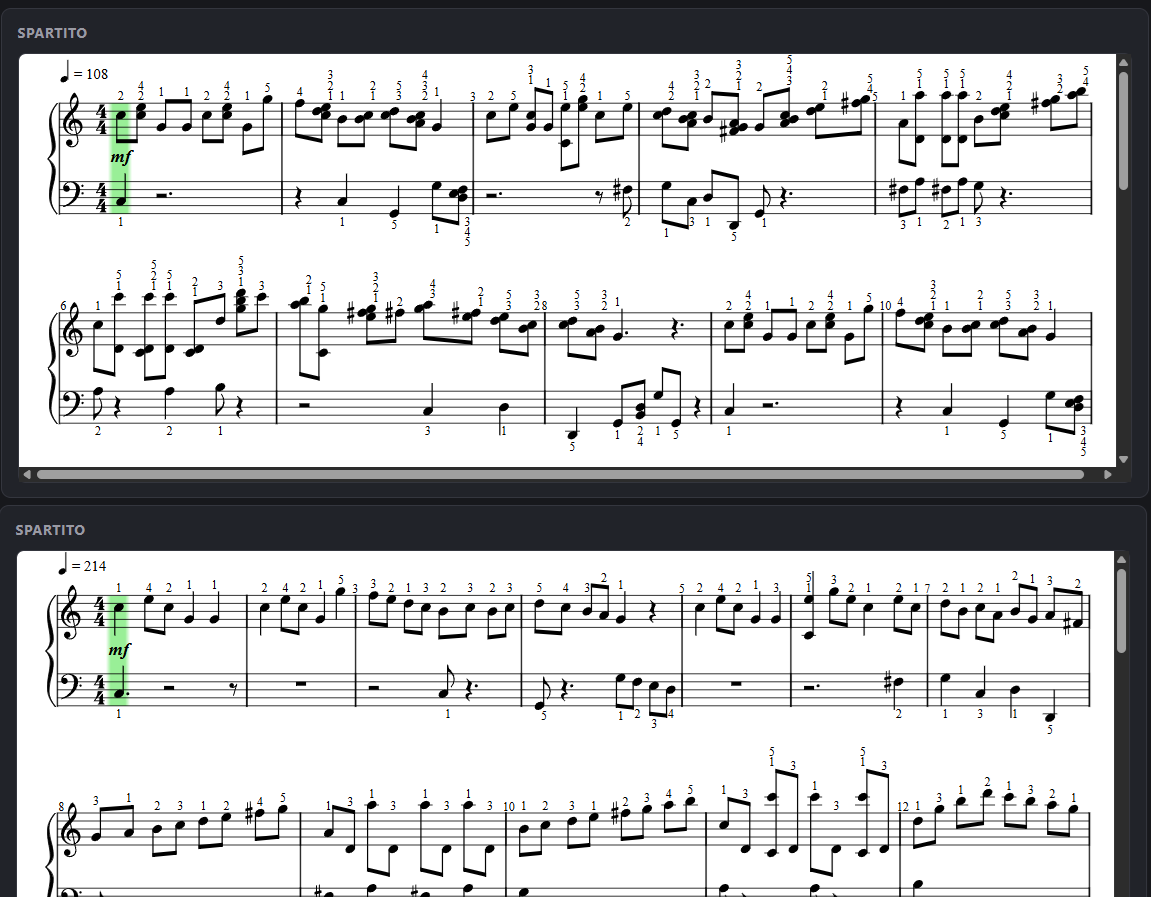
The day Clementi played at 108 instead of 205.
To write a score you need the tempo, that is, how many beats per minute (BPM). The app estimates this value by analyzing the audio through two main clues: the frequency of the notes (the rhythm of the individual attacks) and the cadence of the harmonic changes (how often the chord changes). On the pieces I tried the estimate gives 95 for In The Air Tonight, 61 for Una lunga storia d'amore, 90 for La cura and 70 for A Whiter Shade of Pale. The standard librosa beat tracking on the mix, for La cura, gave 129 instead.
Then, on 20 October 2026, I tried Clementi's Sonatina op. 36 no. 1, a lively piece, and the estimate came out at 108 BPM. The PDF filled up with eighth and sixteenth notes, unreadable.
I measured the attacks: C at 0.98 s, E at 1.28, C at 1.39, G at 1.53, G at 1.84, C at 2.15. A bar lasts 1.17 s, so a quarter note about 0.29 s: about 205 BPM, not 108. The estimate was right in its method and wrong in its result because the search was limited to 60–180 BPM, and the true tempo, outside the range, was being halved.
Raising the upper limit to 240 BPM was enough to make Clementi's estimate jump from 108 to 214 BPM, leaving the results of the other four pieces untouched. The whole problem was right there: by blocking the search at 180 BPM, the algorithm was forced to halve the real tempo, even though the score of that half was only 43% of that of the true tempo.
A good lesson: parameters tuned on just a few slow pieces break at the first fast one. After all, automatic estimates always remain a starting point. Not by chance, in the app the BPM field can be corrected by hand, with the quick buttons ÷2 and ×2 to fix on the spot the doublings and halvings typical of pieces in 2/2.
And rubato? A metronome that re-locks.
Nobody plays at a perfectly constant tempo. That is why the score does not use a rigid metronome: an adaptive metronome (a phase-locked loop) realigns itself to the attacks that fall near the eighth-note grid and corrects the period as it goes, within ±25% of the initial tempo. The constants were tuned on the Clementi piece itself: the two passes of the first repeat, transcribed separately, match 99% in note position and pitch. The player uses the same map, so cursor and score stay aligned even when the performer speeds up or slows down.
A fingering proposal, not an edition.
For each hand the app chooses the fingers with a Viterbi algorithm: it looks for the fingering path that, over the whole phrase, minimizes hand stretches, crossings and leaps. The weights are heuristic and sit at the top of the module. Fingering is added at chord level, one finger for each pitch; with more than five notes in the same chord it assigns none.
Let me be clear: it is a proposal. It does not replace the fingering of an edition prepared by a pianist, who takes the music into account, not just the geometry of the hand. It is meant to give you a starting point that you can correct note by note.
The editor, the player and a piano in the browser.
Automatic transcription is imperfect, and pretending otherwise would be dishonest. That is why, after processing, the app does not stop at the PDF:
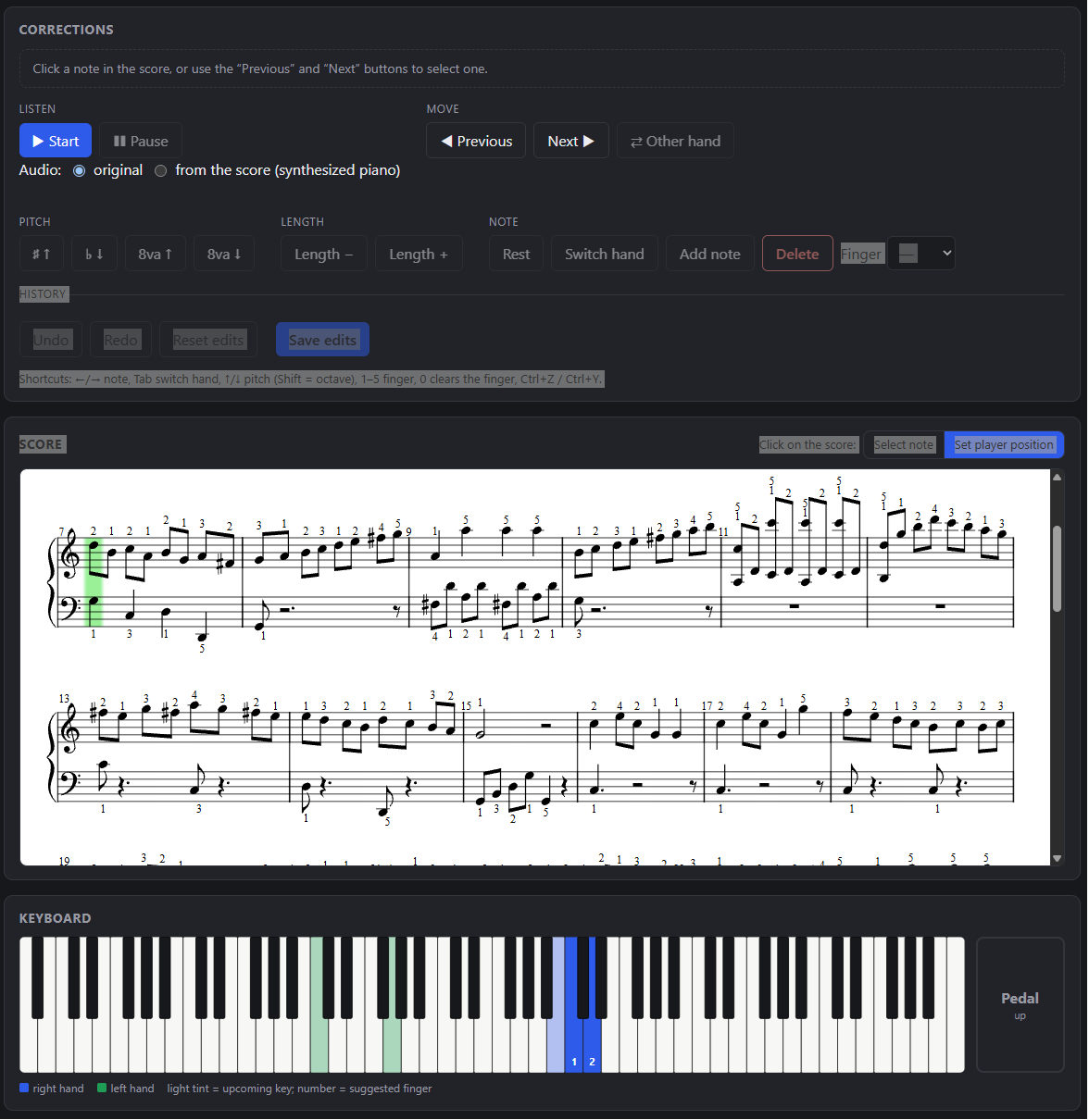
- Synchronized player. You listen to the audio while the score scrolls; a virtual 88-key keyboard highlights the keys to press (blue for the right hand, green for the left), with the finger number and the pedal state. You can jump to any point and slow down to 0.5×.
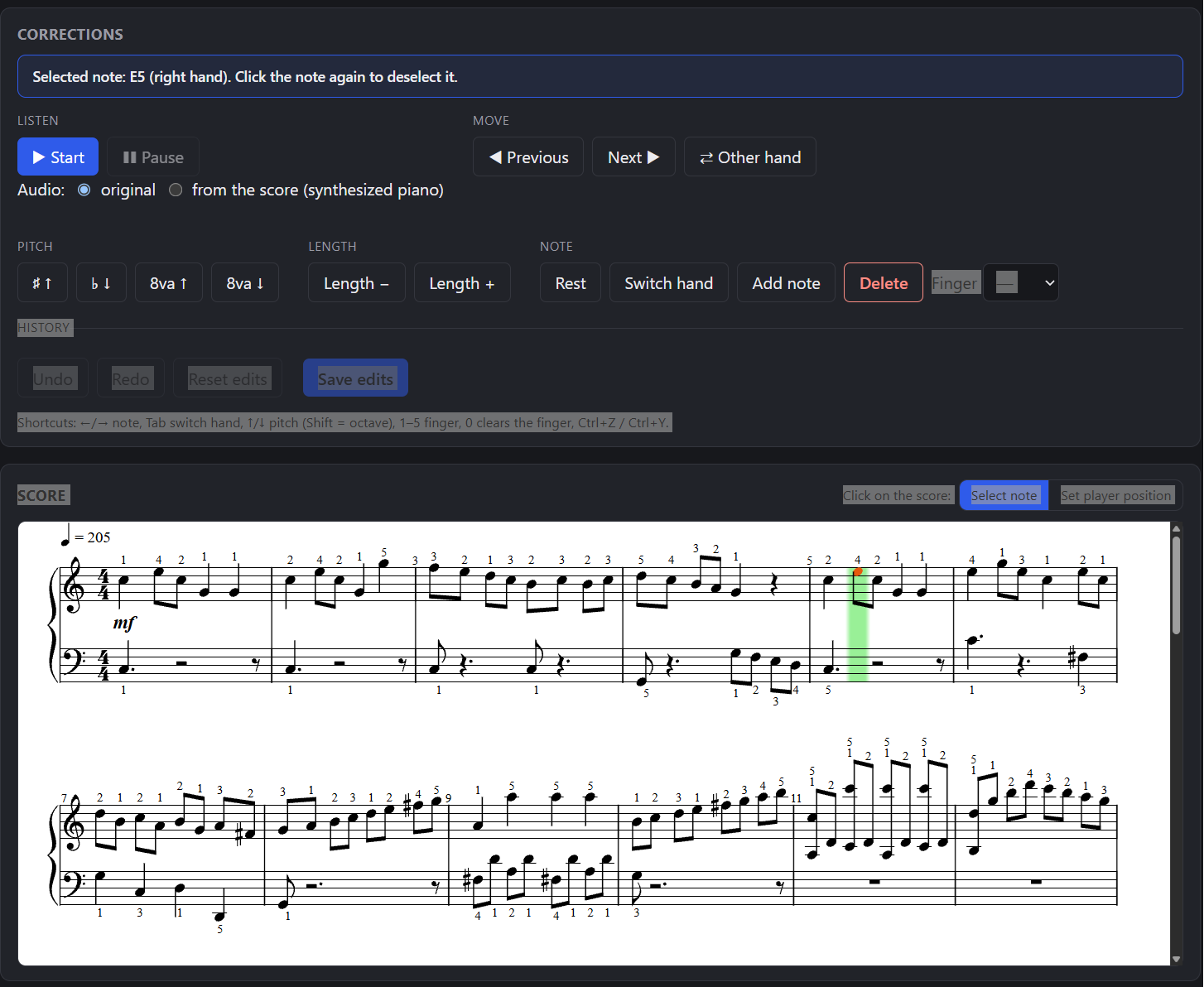
- Note-by-note editor. You click a note on the score (or move with the arrow keys, or with the Previous and Next buttons) and correct its pitch, duration, hand or finger, turn it into a rest, delete it or add a new one. The controls are grouped in a panel — listening, movement, pitch, duration, note, history — so you can work on a tablet too, without a physical keyboard. A click selects the note and moves the audio and the cursor to that point; a double click moves only the player. There are “Undo”, “Redo”, “Reset edits” and “Save edits”, which regenerates PDF, MusicXML and MIDI with the corrections.
- Audio from the score. A piano synthesized in the browser from the notes of the score (pedal included), with the Salamander Grand Piano samples (CC-BY 3.0 license, about 2 MB). From the same corrections panel you choose whether to listen to the original or to the score: hearing what you have corrected is the quickest way to tell whether you corrected it well.
- Three score levels. Faithful, Balanced and Readable: closer to the performance or easier to read. On the Clementi piece the Readable level still gave the best result.
Stopping a long job
A long piece occupies the only work queue and, at first, there was no way to stop it other than restarting the server, losing all the jobs. Today the Jobs panel lists those known to the server — queued, running (with step and percentage), finished, failed, interrupted — and the Interrupt button stops a job within a few seconds, frees the GPU and deletes the temporary files, such as partial downloads. An interrupted job is not an error and offers no files.
Finished, failed or interrupted jobs can be removed from the list (Remove) or deleted together with their folder on disk (Delete, after a confirmation). Folders not modified for more than a day are deleted automatically when the server starts and at every new job, never those of running or queued jobs; the limit can be changed with an environment variable. At the first start with this rule 34 folders out of 50 disappeared, from about 923 to 311 MB.
Interruption is cooperative: each job has its own token and the steps check it. A subprocess such as FFmpeg or MuseScore is terminated, separation stops between one 60-second block and the next, and transcription checks at every segment.
The interface is in Italian, English and Spanish, with automatic, light or dark theme and notes written as Do Re Mi or as A B C.
Also from a PDF or a photo of the score.
Until now spArtitI always started from audio. You can now also drop a score PDF (even a scanned one) or an image (.png, .jpg, .jpeg) into the app. A new step, Recognition, turns the pages into MusicXML with homr, an open-source optical music recognition (OMR) tool built on ONNX models. From there the path is the one for an incoming MusicXML: score with proposed fingering, virtual keyboard, editor, PDF and a synthesized piano in the browser. There is no original audio: you only hear the synthesized piano.
OMR (Optical Music Recognition) is the equivalent of OCR for music notation: it takes the image of a score — a scan, a photo or a PDF — and turns it into a format the computer understands, such as MusicXML. It has to recognize staves, clefs, key signatures, notes (pitch and duration), rests, slurs and repeats. It is harder than OCR because the meaning of a symbol depends on its position and context, symbols overlap, and the rhythm has to be added up within each bar: that is why it gets rhythms wrong more often than pitches. It is a different problem from audio transcription: Transkun listens to a piece and writes the notes, homr looks at a page that is already written.
How it works: omr.py converts the PDF into grayscale images at 200 dpi with PyMuPDF (long side at most 4000 pixels) and hands each page to homr. The pages, up to 30, are merged in order into a single score and the bar numbering carries on. End-of-score repeat signs with no matching start are fixed, otherwise the player would replay the previous pages. An unreadable or blank page is skipped with a warning; an error is raised only if no page is recognized. The title is the file name, because OCR of the title is often wrong. For the app it is a new job type, with the steps recognition, score and PDF.
OMR gets mostly the rhythms wrong (arpeggios across staves, two voices) and the pitches less often. So when the job ends, the app shows an amber box with a warning to check rhythms and bars, and a button to download the recognized MusicXML. At first it was a small grey line: too easy to miss. The recommended path for an exact result is scan, recognition, correction in MuseScore and re-upload of the corrected MusicXML. I do not quote accuracy percentages because I have not measured them: on three real pages the chain produced 534 notes.
homr uses the GPU too: measured on one page, inference takes 0.44 seconds per staff on an RTX 4070 against 2.0 on CPU, and a page costs about 16–18 seconds including startup (on CPU the first measurement was about 1 minute 44 seconds per page). On first use about 130 MB of weights are downloaded, so the network is needed.
Then there is a question that came straight out of the OMR: homr recognizes phrase slurs (not very reliably) and not the pedal, while the “from score” path discarded both anyway. The app now reads pedal and phrase slurs from the MusicXML. The technical surprise: music21's expandRepeats() detaches these marks from the notes (I checked it on a test file), so they are read from the unexpanded file and carried over to the repeats by bar number. The pedal reaches the timeline, keyboard, synthesized piano and PDF; the slurs reach the PDF and the displayed score, without changing the sound. A note deleted in the editor takes its slur with it.
What it doesn't do, and why everything runs locally.
I prefer a list of limits written today to a surprise six months from now. These are the known ones:
- It works best with solo piano. On mixes the piano isolated by Demucs is “dirty”: the transcriber may invent or miss notes, especially if another instrument plays in the same range. Quality has to be judged by ear, on the piece you care about. The violin has no track of its own and ends up in “other”.
- The tempo is an estimate. The score follows variations within ±25%, but remains a proposal; changes of meter are out of scope.
- Heuristics tuned on a few pieces. Thresholds and weights were adjusted mostly on the Clementi piece: other repertoires may need corrections, as the 180 BPM limit itself showed.
- One voice per hand. The hands are split at middle C and each hand has a single voice: complex polyphony and several voices per staff are not handled.
- Long pieces. Beyond 10 minutes of excerpt an explicit confirmation is required. A 33-minute piece was handled with constant memory, thanks to separation in 60-second blocks (without it, about 4 GB would be needed), but drawing the score and the model on the GPU can saturate a PC with little RAM.
- Job interruption. Downloading from a URL with Start and End uses FFmpeg with no checkpoints: the interruption takes effect only when that download ends. Reading the video information, loading the Demucs model and the Score step (music21) cannot be interrupted, nor can regenerating and saving edits.
- Scans and PDFs. At most 30 pages; constant tempo and meter; one voice per staff; no pedal recognized by the OMR; instruments other than piano and orchestral scores are out of scope. Recognition of a single page cannot be interrupted midway (cancellation is checked between pages) and, if two pages have a different number of staves, one hand may be dropped or emptied, with a warning only in the log. Rhythm errors have to be fixed by hand.
- The job list lives in memory. After a server restart it starts empty; the files remain on disk.
As for the choice of running locally: the app starts with uv run spartiti-serve
(or with the avvia.bat script) and the server listens only on 127.0.0.1. The music does
not go through any external transcription service. The network is needed to download the video from YouTube, for
the Demucs model (about 300 MB, on first use) and for the piano samples (once only). A reminder that always
applies: download only content you have the right to make a personal copy of, in compliance with YouTube's terms
and copyright law.
For now, then, spArtitI runs locally, on my computer. In the future it could be moved to the virtual servers already up and running, whose architecture is described in Two VPSes, a GPU That Wakes Itself Up: an always-on ARM64 server and an A10 GPU that starts only when needed.
How it was built.
spArtitI is developed with Claude Code, starting from a specification and a plan written before the code. It uses only open-source libraries. For the PDF input I followed the same scheme (brainstorming, specification, plan, one implementer and one reviewer per task): the final review of the whole branch found four important problems that the per-task reviews had not seen — repeat signs that replay earlier pages, a title taken from OCR, transparent PNGs and a blank page. The Clementi episode still teaches that tests on prepared data do not replace a trial on a real piece, never seen before.
Frequently asked questions.
How do you turn a YouTube video into sheet music?
With spArtitI you paste the URL of the video (optionally setting the Start and End of the excerpt): the app extracts the audio, transcribes it to MIDI with Transkun and produces MusicXML and a PDF with proposed fingering. On a 6.7-minute piece it takes about 100 seconds on an RTX 4070 GPU.
Does it work with pieces with several instruments?
Yes, but with less certain results. Demucs first isolates the piano from the mix, but the resulting track contains artifacts and the transcriber may invent or miss notes. It works best with solo piano; on mixes you should judge the result by ear.
How accurate is the transcription?
It is good but imperfect, which is why the app includes an editor. The comparison on three real pieces favored Transkun on the isolated piano: it writes 2 to 8 times fewer notes than the ByteDance model and is stable. The tempo is estimated and can be corrected by hand.
Can I correct the score?
Yes. You can edit one note at a time (pitch, duration, hand, finger), delete it or add one, with “Undo” and “Redo”, even on a tablet thanks to the button-based controls. “Save edits” regenerates PDF, MusicXML and MIDI with the corrections. The MP3 and the video do not change.
Is the fingering reliable?
It is a proposal computed with a Viterbi algorithm that reduces hand stretches, crossings and leaps. It does not replace the fingering of an edition prepared by a pianist: use it as a starting point.
Can I interrupt a long job?
Yes. The Jobs panel lists queued, running, finished, failed and interrupted jobs, and “Interrupt” stops a job within a few seconds, frees the GPU and deletes the temporary files. The exception is downloading from a URL with Start and End, which stops only when it finishes.
Can I start from a PDF or a photo of a score?
Yes. Drop a PDF (even a scanned one, up to 30 pages) or a PNG or JPG image into the app: homr recognizes the pages and turns them into MusicXML, then the path is the one for a score with proposed fingering, editor and PDF. OMR gets mostly the rhythms wrong, so it is best to download the recognized MusicXML, correct it in MuseScore and upload it again.
Do I need a GPU? Does my data stay on my computer?
An NVIDIA GPU is not required: without one, the app uses the CPU and is about 3.5 times slower. Processing happens locally and the server listens only on your computer; the network is needed only to download the video, the Demucs model and the piano samples.